Call forwarding to an AI receptionist: Forward your line. Go live the same day.
No new phone system and no technician. Sign up, tell your AI receptionist about your business, forward your line and test it.
Keep your number
Forward your line to us. Nothing else changes.
Keep your number and forward it to us: always, when you don't answer, when you're busy, or after hours. It's the way we recommend for every business.
Keep your number
Customers keep calling the number they know. Forward always, when you don't answer, when you're busy, or after hours.
Outgoing calls stay normal
You still make calls from your own phone, showing your usual number. Nothing changes for the people you ring.
Turn it off any time
No new phone system and nothing to sign. Turn forwarding off from your phone and calls ring you as before.
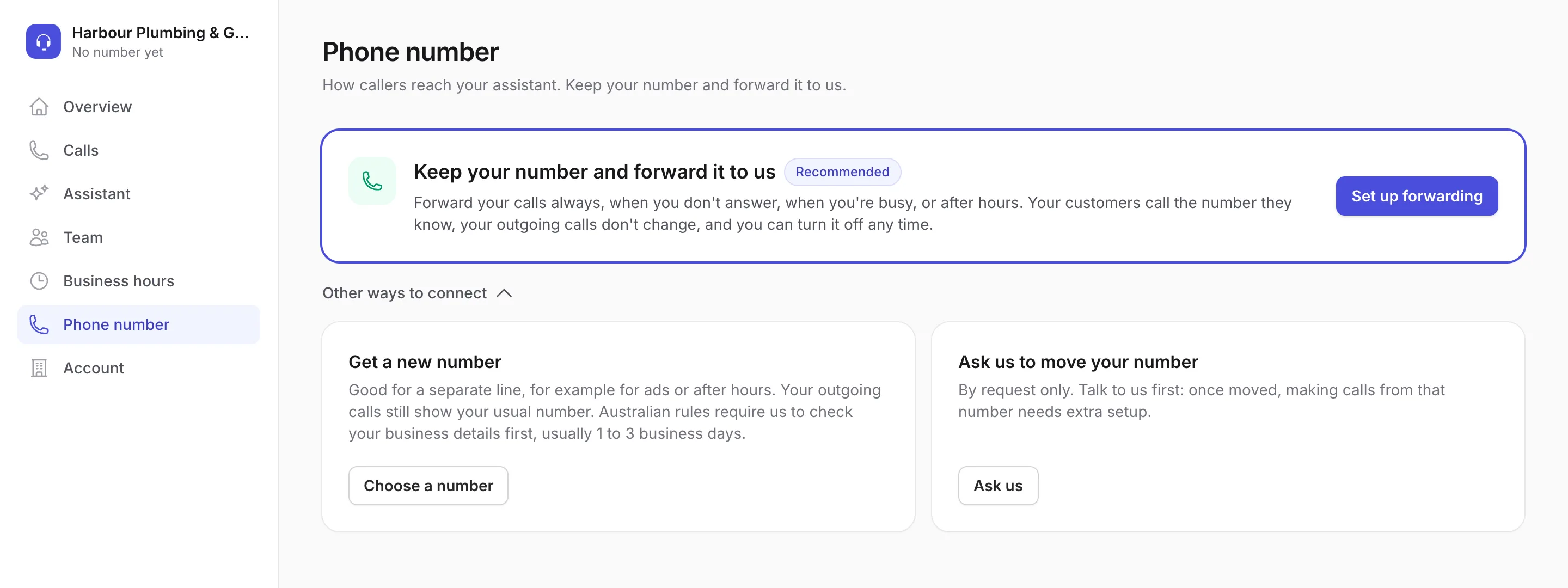
Forwarding, step by step
From sign-up to your first answered call.
These are the real screens from the app, shown with a sample plumbing business. Each step is checked before the next.
-
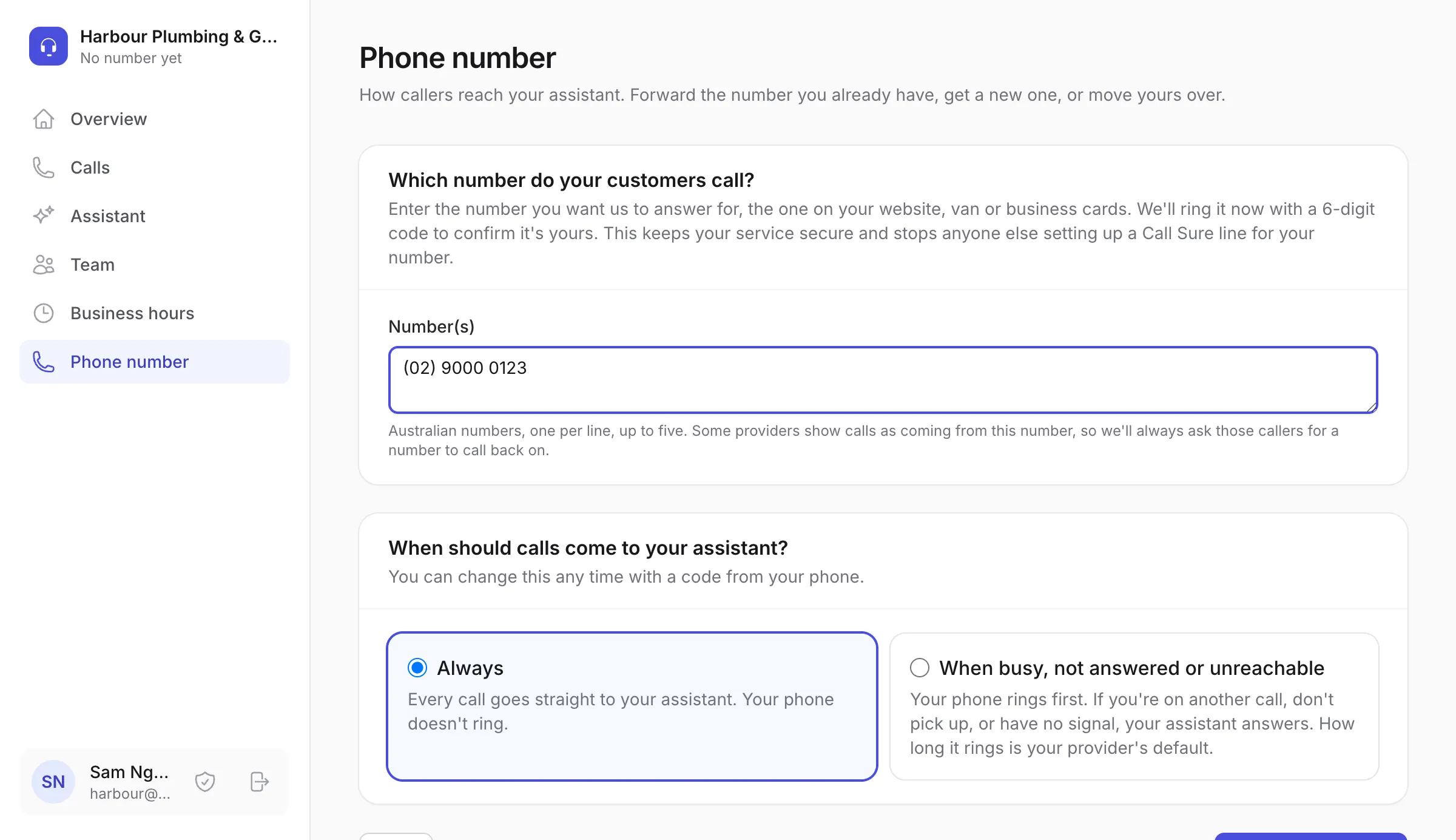
1
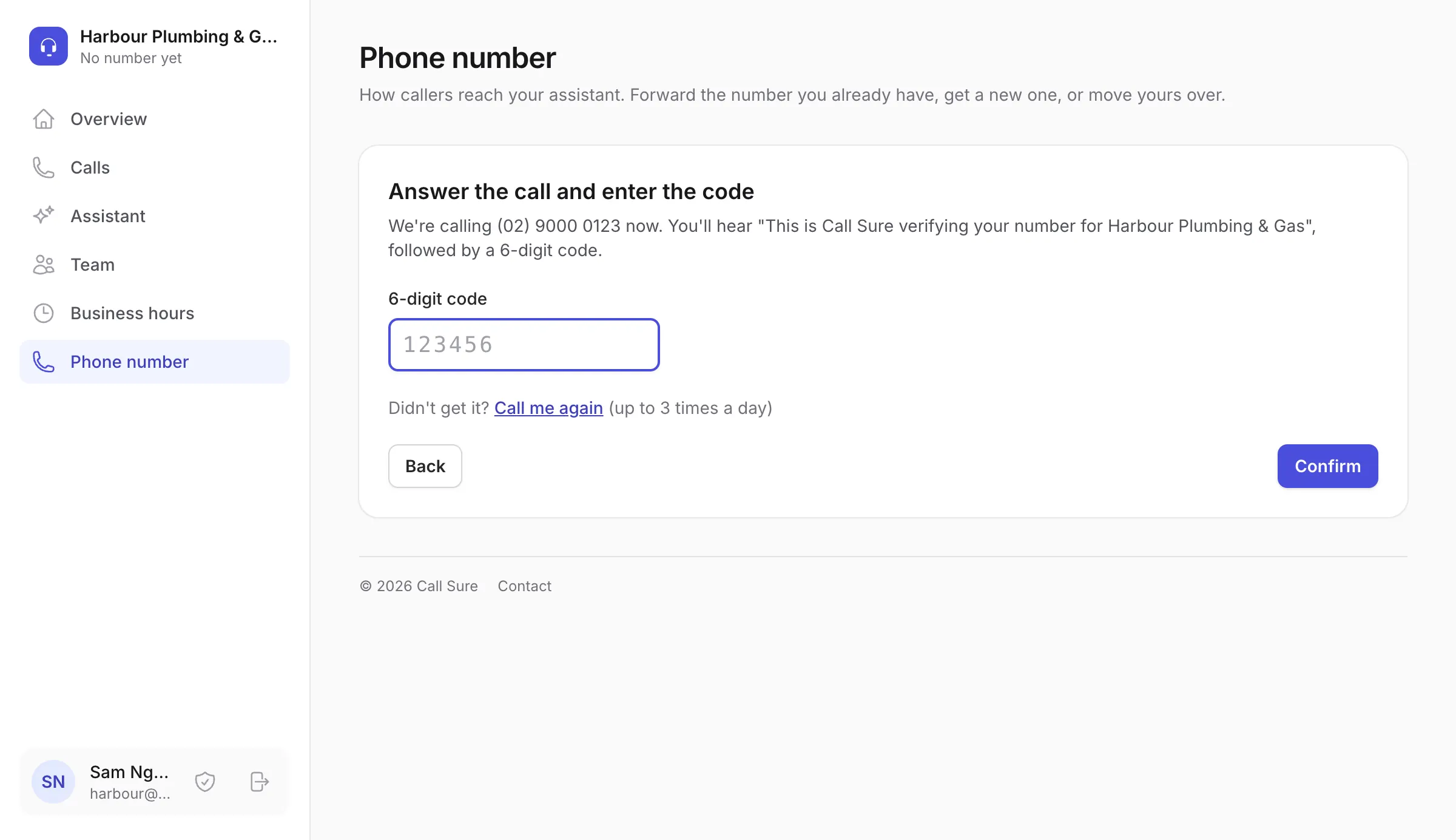
Confirm your business number
Enter the number your customers call, and choose whether every call is forwarded or only the ones you miss. You can add more than one line.
We ring that number and read out a 6-digit code. Type it in to show the number is yours.
-
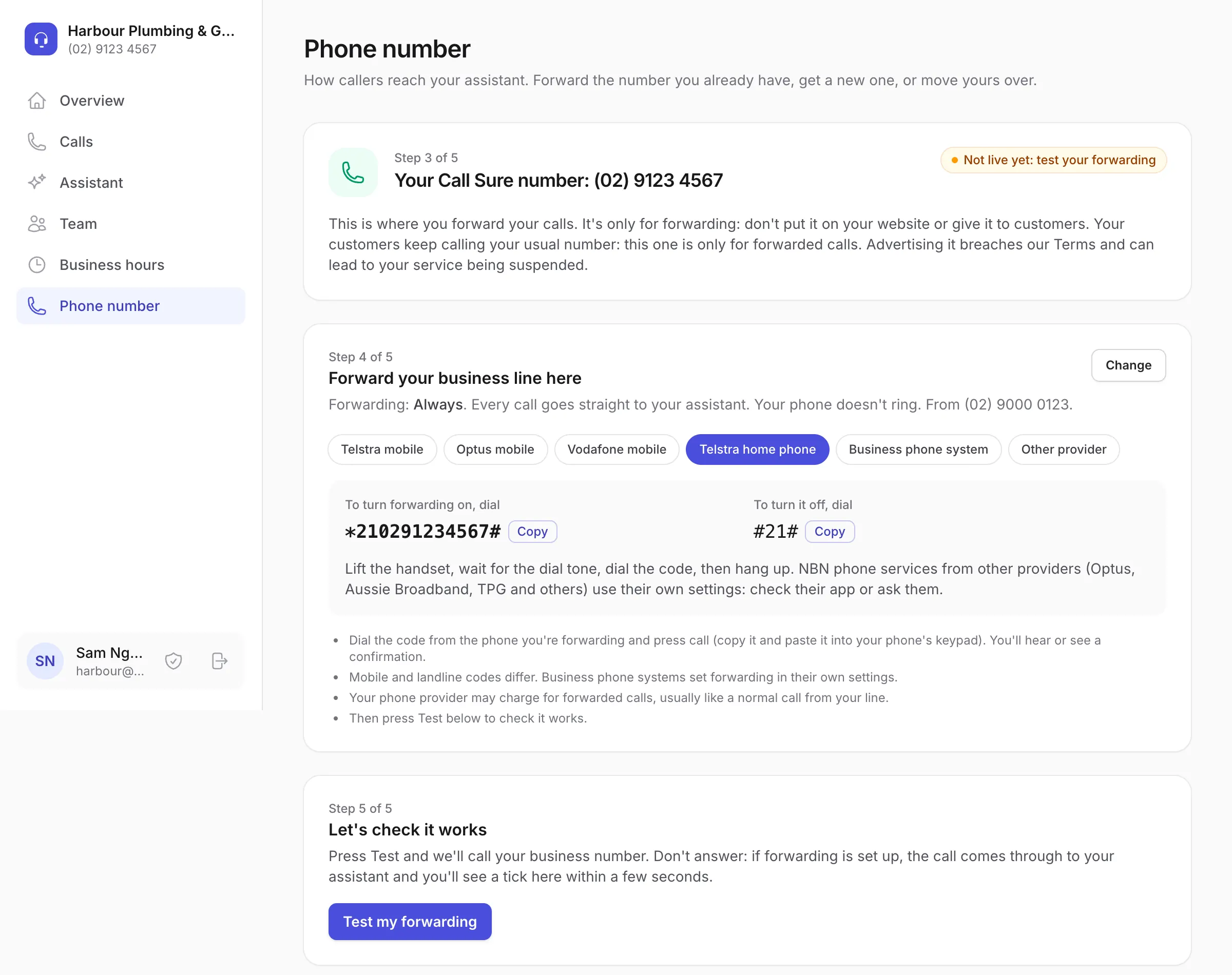
2
Forward your line to Call Sure
You're given a Call Sure number. It's only for forwarding: your customers keep calling the number they know.
The page shows the code to dial for common mobile and home phone services. For anything else, your phone provider's app or support can set it up.
-
3
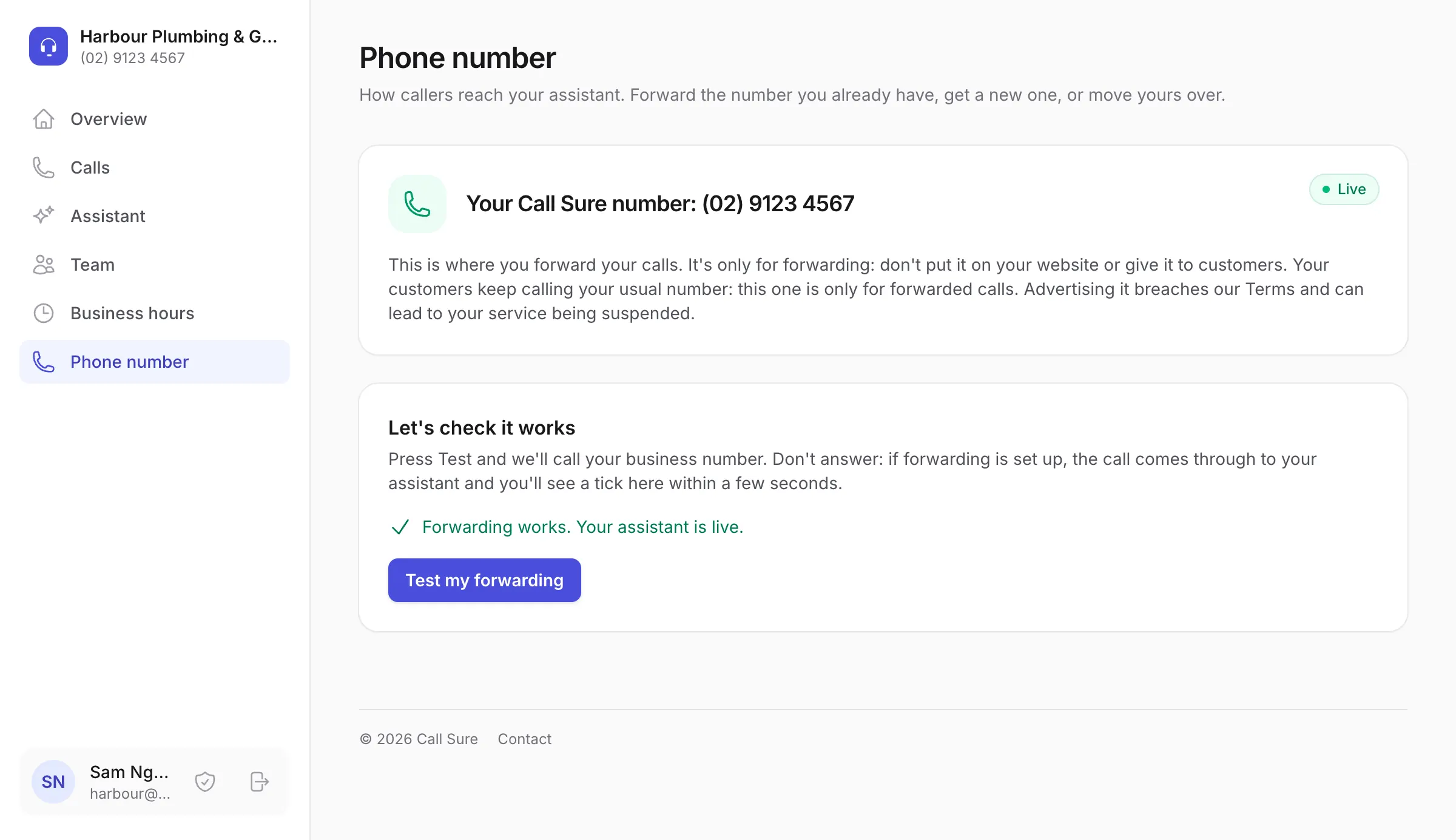
Test your forwarding
Press "Test my forwarding". We ring your business line from our end and check the call arrives at your assistant.
Your assistant only starts answering once the test passes, so you know forwarding works before you rely on it.
-
4
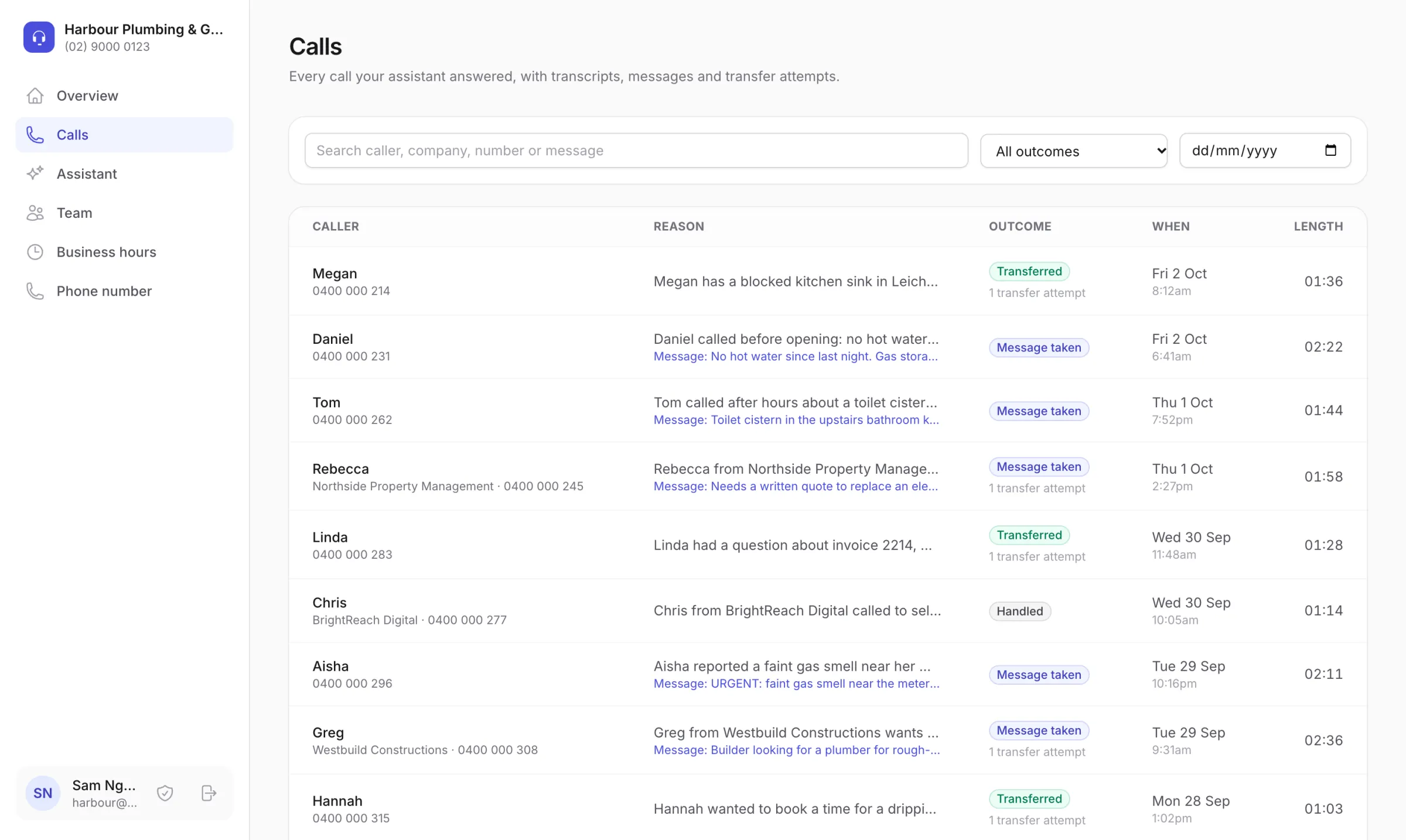
You're live
Calls to your business line now reach your assistant: every call, or the ones you miss, as you chose.
Every call shows up in your dashboard with a summary and transcript, and a call alert lands in your email straight after.
Ready to try it on your own line?
Start a 14-day free trial with 60 minutes of calls. No card needed.
Your assistant, team and hours
Brief it like a new receptionist.
Do this before or after you forward. Everything can be changed at any time, and it applies from the next call.
Start from your website
Add your website when you sign up, or later on the Assistant page, and we'll draft your assistant for you to check: your services, what to ask callers, your hours.
- We read up to 10 public pages of your site, such as your services, about and contact pages.
- A "Please check" list flags anything unclear or contradictory, so you know where to look.
- Hours and team members found on your site are suggestions. They're only applied if you choose.
- It's a draft: edit anything before your first calls. No website? Brief it yourself instead.
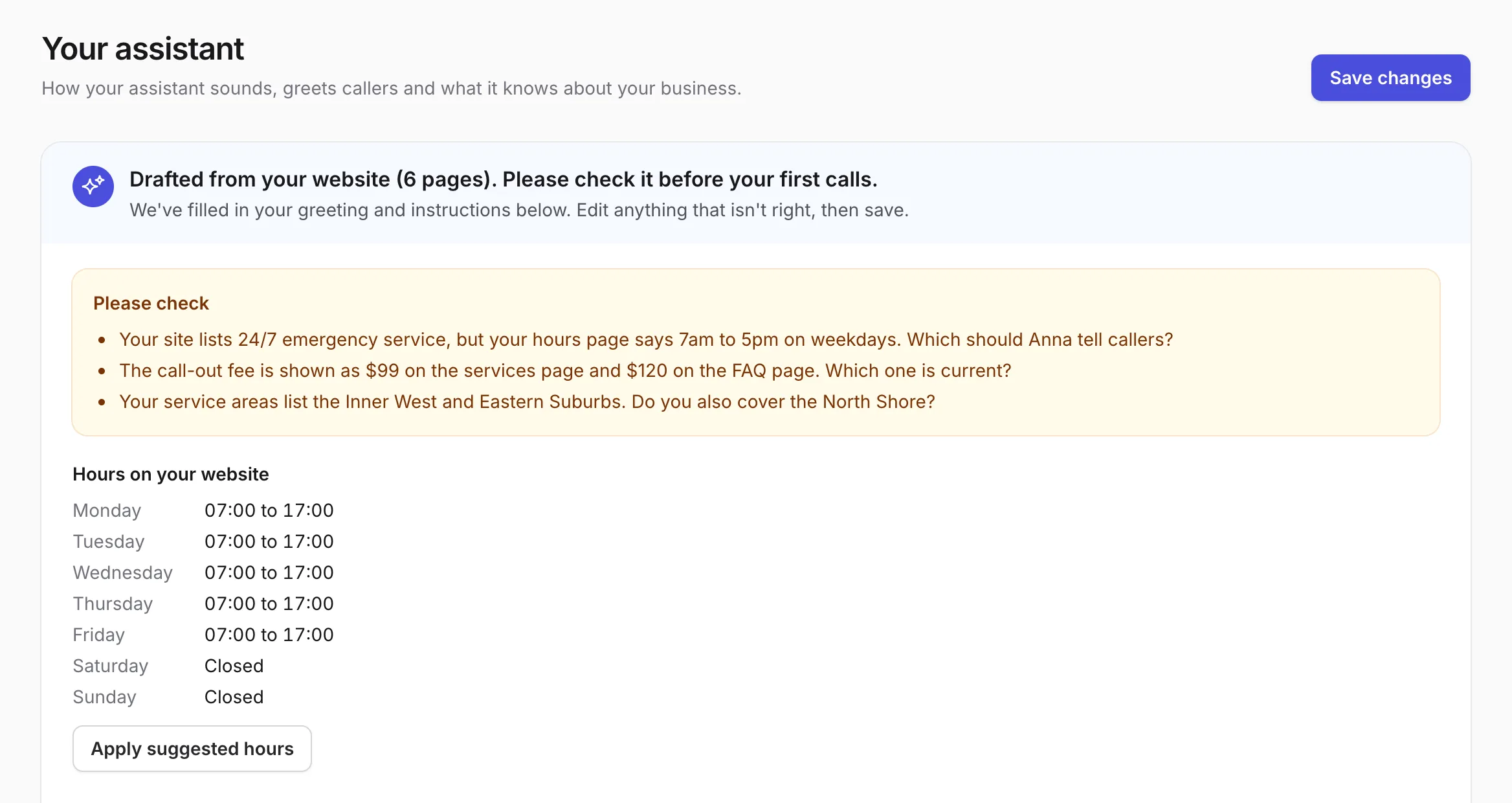
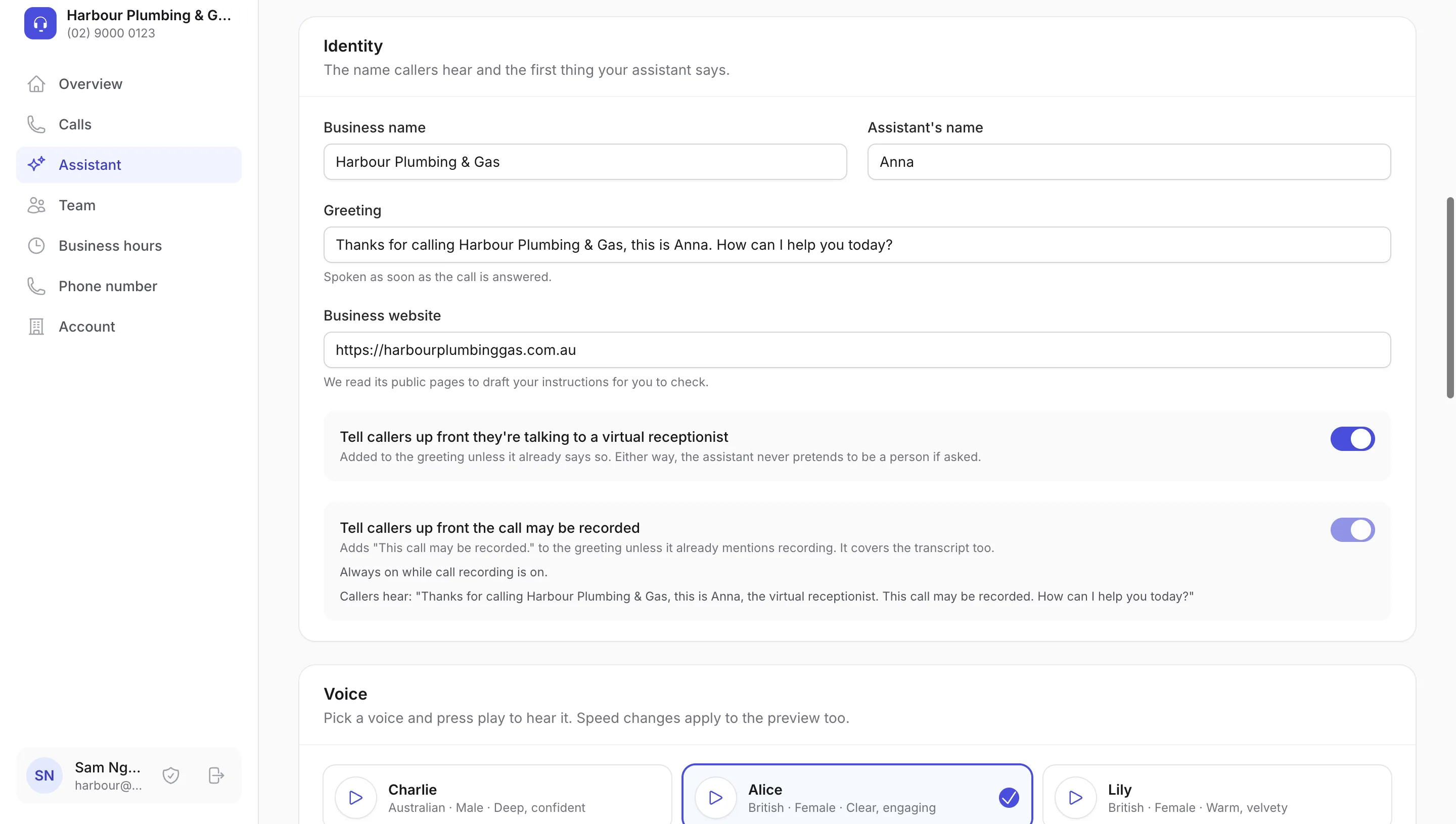
Your assistant
Choose its name, greeting and voice. Tell it what you do, where you work, what you charge and what to say in common situations.
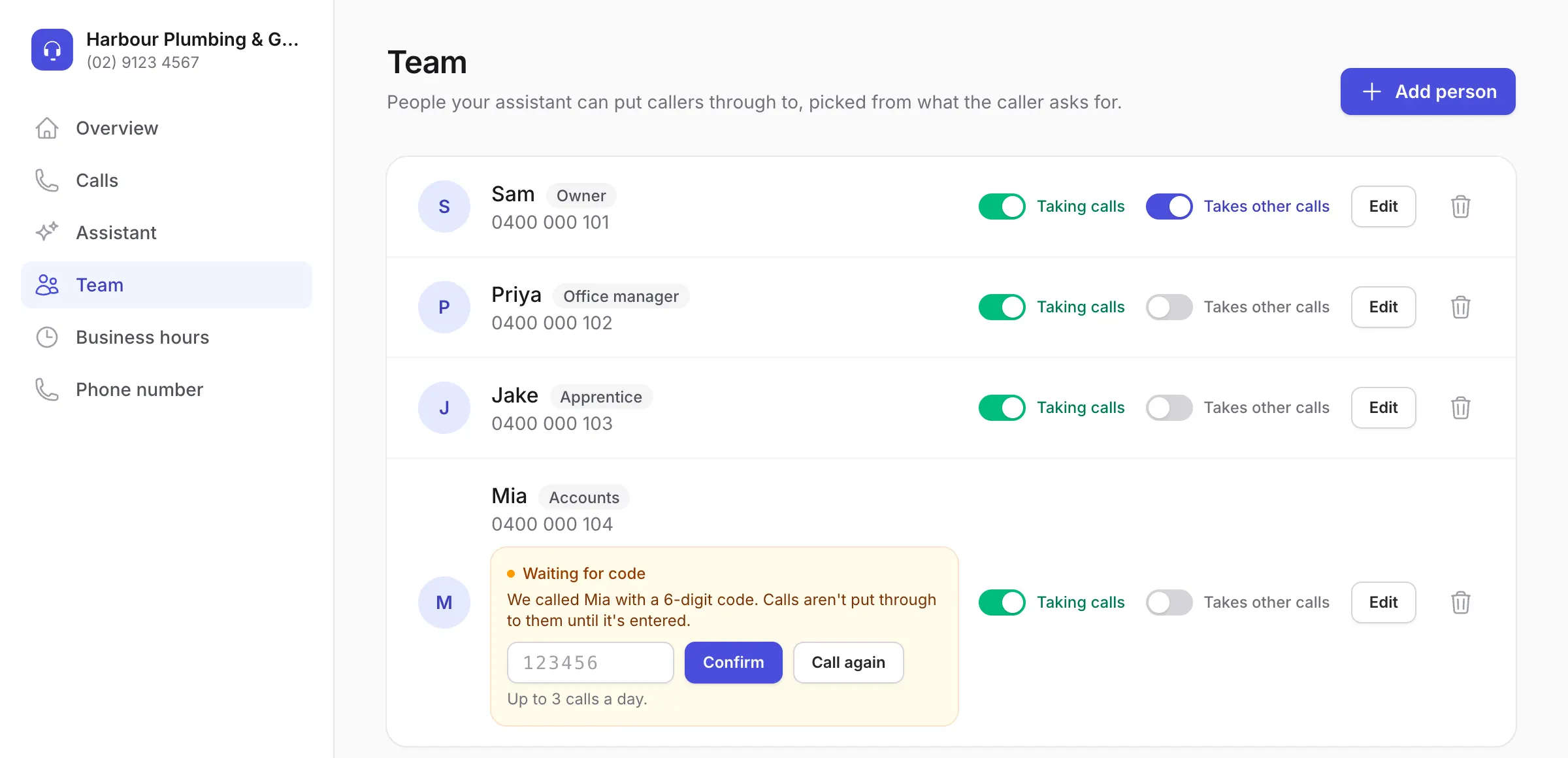
Your team
Add the people who take calls, with their role or department. Each phone is confirmed with a quick code call before a transfer can ring it.
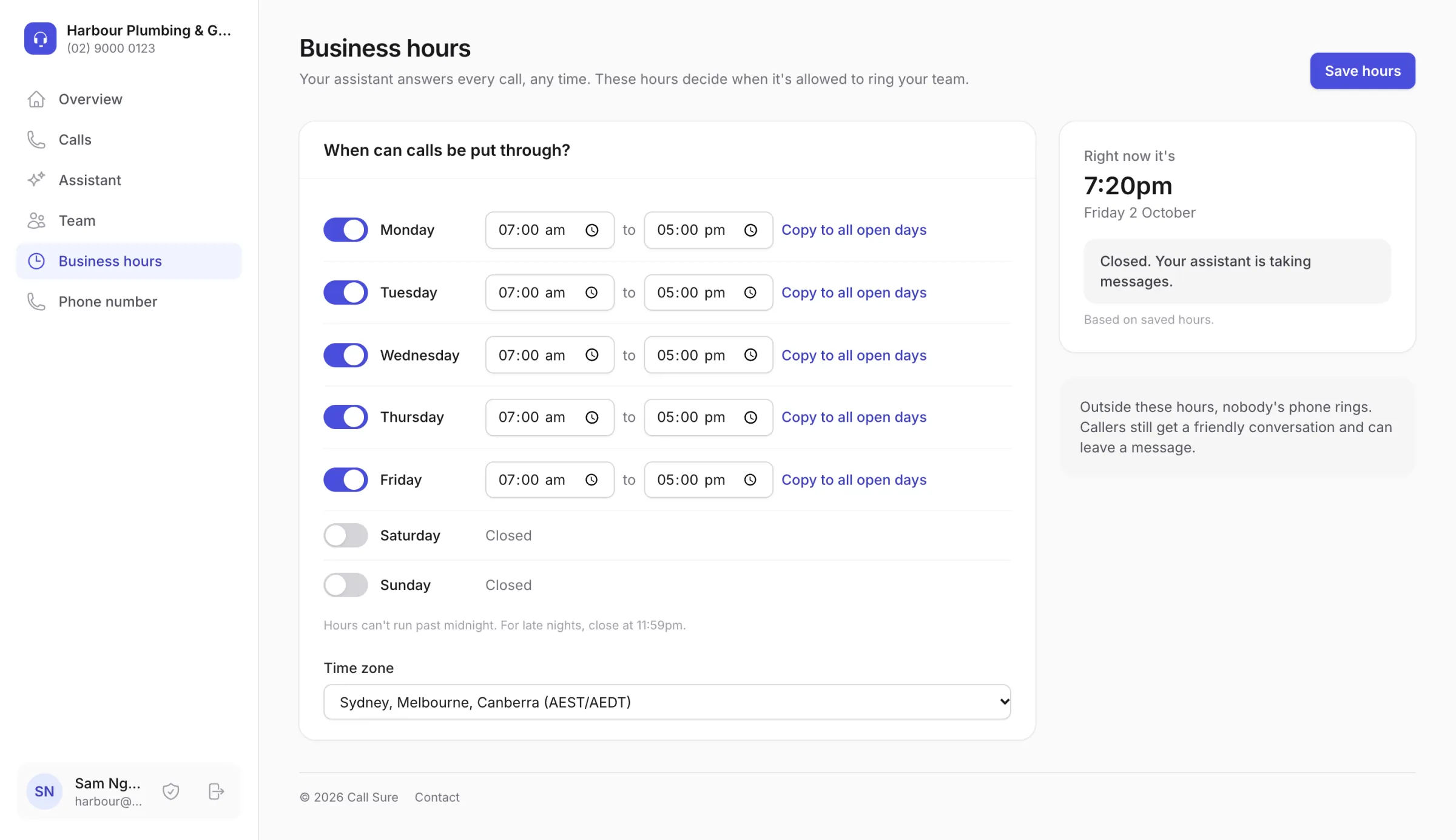
Your hours
Set when calls can be put through, day by day. Outside those hours nobody is rung, and your assistant takes messages.
What you need
Four things, and no card.
- The phone number your customers call, and the phone it rings on.
- A way to change that line's call forwarding: usually a short code you dial, or your phone provider's app.
- The mobile numbers of anyone who should take calls.
- Your website, if you have one, so we can draft your assistant for you to check.
How long it takes
Usually live the same day.
Forwarding needs no paperwork. Confirm your number with a code call, dial the forwarding code, test it, and your assistant starts answering.
Other options
- A new number
- Good for a separate line, for example for ads or after hours. Your outgoing calls still show your usual number. Australian rules require us to check your business details first, usually 1 to 3 business days.
- Moving your number to us
- By request only. Talk to us first: once moved, making calls from that number needs extra setup.
FAQ
Setting up, answered.
Still wondering? Ring 07 3608 1800 and ask our receptionist, or email [email protected].
What do I need to get started?
The phone number your customers call, and a way to change its call forwarding (usually a short code you dial, or your phone provider's app). The mobile numbers of anyone who should take calls. And your website, if you have one, so we can draft your assistant for you to check. No card for the free trial.
How does forwarding work?
We give you a Call Sure number to forward your business line to. You set the forwarding on your phone, usually by dialling a short code we show you, then press "Test my forwarding": we ring your line and check the call reaches your assistant. Your assistant starts answering once the test passes.
Does my own phone still ring?
Your choice. Forward every call and your assistant answers them all. Or forward only when you are busy, don't answer or have no signal: your phone rings first, and your assistant picks up the calls you miss. For after hours only, switch forwarding on when you finish for the day, or use your phone system's time rules.
Why do you ring my number with a code?
To check the number is really yours before we connect it, and the same for each team member's phone before a transfer can ring it. We call, read out a 6-digit code, and you type it in. It takes a minute.
Can I forward more than one number?
Yes. You can forward several of your lines, such as a landline and a mobile, to your one Call Sure number. Each one is confirmed with a code call first.
Can I get a new number or move mine to you?
Forwarding suits most businesses, but there are other options. A new local 02, 03, 07 or 08 number is good for a separate line, for example for ads or after hours, and your outgoing calls still show your usual number. It needs your business details checked first, as Australian rules require (usually 1 to 3 business days). Moving your number to us is by request only: talk to us first, because once moved, making calls from that number needs extra setup.
Your next call could be your next job.
Try it free for 14 days, with 60 minutes of calls and no card. Or hear it for yourself right now.